
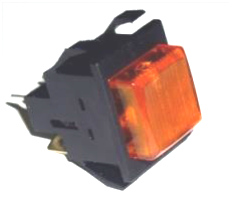
Wilbur Curtis WC-152 ELE100 Aftermarket SWITCH, DISPENSE MOM. (AMBER)
The Wilbur Curtis WC-152 ELE100 Aftermarket Switch is a critical momentary dispense switch designed for commercial coffee and tea brewing systems. This amber-lighted push button operates on a 120V circuit and is rated for up to 10A at 250V, providing the durable tactile response required for high-volume beverage service. As an SPST (Single Pole Single Throw) component, it provides precise control over the dispensing solenoid or dump valve, ensuring consistent flow rates during peak hours. This 120V coffee brewer switch is a direct replacement for the OEM Wilbur Curtis WC-152 and WC-140 models, frequently found in Alpha, G3, and Gemini series brewers. It features standard spade connectors for a secure, heat-resistant termination on the wiring harness. Replacing a soft or unresponsive brew start button with this amber momentary switch restores machine uptime and prevents "no-dispense" service calls caused by carbon tracking or internal contact fatigue in the original control interface.
Key Benefits:- Direct OEM Compatibility: Engineered to replace Wilbur Curtis WC-152 and WC-140 switches without modification.
- Amber Illumination: Integrated 120V pilot light provides immediate visual status to the operator during the brew cycle.
- Industrial Durability: Rated for 10A 250V to handle inductive loads from dispense solenoids and control modules reliably.
- Fast Installation: Standard panel-mount design with spade terminal connections simplifies field replacement for technicians.
- Tactile Momentary Action: Ensures precise "press-to-start" functionality for manual and programmed dispensing cycles.
- Is this switch compatible with 220V Wilbur Curtis units? While the switch contacts are rated for 250V, the integrated amber lamp is designed for 120V circuits. Verify your control circuit voltage before installation.
- Will this fix a brewer that won't start despite being powered on? If the display is active but the brew cycle won't initiate, a failed momentary brew switch is a common culprit. Confirm continuity across the terminals while the button is depressed.
- Does the amber light staying on mean the switch is faulty? Not necessarily; the light indicates power is reaching the terminal. If the light is on but the machine won't dispense, check the solenoid or the UCM.
Disclaimer: While we strive for 100% accuracy, product data and specifications are subject to change. Please contact our team to confirm compatibility or technical details before purchasing.
QUESTIONS & ANSWERS
Have a Question?
Be the first to ask a question about this.