
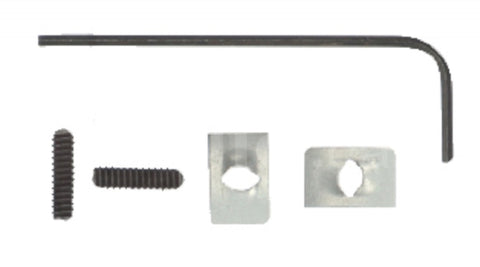
Resideo 272804A Assembly
The Resideo 272804A is a critical field-service accessory designed for precise temperature regulation and physical security of electric heating systems. This range stop and locking screws assembly allows technicians to set definitive minimum and maximum setpoint limits, preventing end-user over-adjustment that leads to energy waste or equipment strain. Engineered for Honeywell Home thermostats, including the T410, T498, T4398, and T4098 series, this kit is the direct equivalent to the 272804A/U model. The hardware utilizes high-durability composite plastic dowels for the range stops and includes Tinnerman speed nuts with Allen-head screws for cover security. Whether you are managing multi-family housing or commercial spaces, this thermostat locking kit ensures the integrity of your HVAC calibration remains intact against unauthorized tampering.
Key Benefits- Precise Setpoint Control: Includes two plastic pins to mechanically lock in minimum and maximum temperature settings.
- Enhanced Security: Features locking cover screws that prevent unauthorized access to the thermostat's internal components.
- Universal Compatibility: Validated for use with legacy and modern electric heating thermostats like the T410 and T498.
- Complete Hardware Kit: Ships with the 272804A assembly, including speed nuts and Allen screws required for a professional install.
- Durable Construction: Built with industrial-grade materials to withstand frequent thermal cycling in high-traffic environments.
Is the Resideo 272804A compatible with all Honeywell thermostats?
No, this specific range stop assembly is engineered primarily for line-voltage electric heat thermostats such as the T410, T4398, and T498 (units manufactured after Nov 1993).
What is the difference between 272804A and 272804A/U?
The 272804A and 272804A/U are identical components; the "/U" suffix simply denotes universal retail packaging, while the specifications remain the same.
How do you install the range stops?
After setting the desired setpoint, remove the cover and insert the plastic pins into the designated minimum or maximum holes on the inside back of the thermostat cover to restrict dial rotation.
Disclaimer: While we strive for 100% accuracy, product data and specifications are subject to change. Please contact our team to confirm compatibility or technical details before purchasing.
QUESTIONS & ANSWERS
Have a Question?
Be the first to ask a question about this.